Tuesday, May 13, 2008

Since the arrival of my fourth child in February, I have no time for scrapbooking. So this site is on a temporary hiatus...perhaps sabbatical is a more realistic term for what's going on here. But I'll be back...I promise that. Just let me get through the non-stop nursing phase.

I am trying to make periodic updates on my "all-about-me" blog so if it's *me* you're interested in, just head over there. :)

Monday, February 18, 2008

More on ACDSee Categories

Well, since someone not only looked at my photo organization post but actually commented on it, let me elaborate a little. (*hehe* The danger of commenting.) Here's more specific information about my ACDSee categories:

Albums
My first high level category is Albums. This is where I keep track of photos that I want to scrapbook. When I created the category, I was thinking that I would have a book for each year...but now I'm rethinking that. But of course it's pretty easy to add new subcategories so I can move stuff around easily. Anyway, I'm getting off purpose here.

Gift
My next category is called "Gift". I have a subcategory for each of the kids. I came up with this idea at my first child's baby shower. I took pictures of each of the gifts - with the card, if possible - to help me keep track of who gave us what. And then it made writing thank you notes so much easier. So now I still do this after birthday parties, et cetera. I try to immediately go add notes about who gave us what. So this is really more a life management thing but it's very helpful.

Layout Ideas
If I come up with an idea for something I want to scrapbook, I create a subcategory and then I'll go look for pictures. So then I can get back to it later. I only have one subcategory so far and that was "legos"...which I've already done (just scroll down a little). After reading all my inspirational scrapbooking books, I was thinking about the things that are important, define us, et cetera and I knew I had to do a layout about legos for my son!

People
This is pretty self-explanatory. I have categories for people that show up in my photos a lot. This is the category I use the most. Just the other day my future sister-in-law came over looking for photos of my brother to use at their wedding. So I just clicked on his category and voila, hundreds of photos of him appeared. :)

Places
Another category that I don't think I need to spend much time elaborating on.

Printing
Back when I was scrapbooking the traditional way, this is where I would keep track of the photos that I wanted to print. I haven't used this category for awhile.

Scrapbook
This is where I'm *trying* to keep my scrapbooking supplies organized. I have subcategories for what it is (alphabet, background, embellishment, etc), for what color it is, for who designed it, for themes (holidays, events, etc) and when I got it. So far I've not done a great job at putting everything into the appropriate categories but the infrastructure is there. :)

Transfers
I try to keep track of the photos that I've given to people. A couple of years ago I made disks for various family members and I wanted to be able to keep track of which ones they had so that in the future I can give them new disks without all the same old stuff. So that's what that is.

Various
The first one is "Art". I have categories for the kids and myself. I've scanned stuff that I drew in highschool, etc so those go in my art category. And then I take pictures of my children's art projects so I just "file" them accordingly. And then I'm a calloused mom and I toss the originals...or at least most of them.

I have one called "Family Stuff" where I keep track of group photos that we take throughout the year, pictures of my pregnancy tummy, pictures of the kids in their car seats, or on a certain chair, you get the idea.

I also have a section for house stuff. There are several subcategories but one of them is for decorating ideas. I've taken pictures at models where I liked something so I can always go look at the photos in that category for decorating inspiration. :)

So there you go. There's my ACDSee broken down. I try to back it up frequently because if I ever lost the information in this database, I'd be devastated. I already had a close brush with that and did lose *some* information. Not fun. So back up, back up, back up!
Sunday, February 17, 2008

Getting Your Photos Organized

Have I ever mentioned my system for storing my photos on my computer? My system works pretty well for me so I'll share it here. The photo manager that I use is ACDSee and I really like it. I just wish I could upload straight from ACDSee to Shutterfly or my blog but I'm hoping they'll add options to simplify online printing at some point. Despite that flaw, ACDSee is great for organizing your photos.

When I download pictures from my camera, I store them by date. I have folders for each decade, then year, then month then specific day. I'll frequently put a short label for the day after the date. In the screenshot below, you can see my folder tree on the left side.


On the right side you can see checkboxes for categories. I have categories for each person in the household plus family members and friends that are in a lot of photos. Some other categories and subcategories that I used a lot are Places, Art, Pictures of the House, Pregnancy Photos, Family Photos.

You might also notice that ACDSee also has a rating system. I don't bother to rate all my photos but the photos that I like, I'll mark a 4 or a 5.

This is where it gets cool. You can use all of this information to create search parameters to retrieve certain photos. For example, when I did my holiday collage to go with our holiday letter, I entered the following parameters: all photos rated 5 in the year 2007. Then I just sorted through those and pulled out the ones I liked. If I want a nice picture of one of the kids at the beach, I can select their category, the beach category and then the rating(s) that I want.

I have categories related to my scrapbooking too. In addition to having all my digital scrapbooking supplies categorized, I also have a category for photos that I want to scrapbook.

I'm not always great about keeping the categories up-to-date but that may partially be fault of the number of pictures that I take. It'd be a lot easier for a more normal person. :)

Sunday, February 03, 2008

Public Scrap Gallery

I have a little gallery at Designer Digitals now.

Lego Love


My first attempt at a web challenge. Woot!

Fonts: 2 Peas Architect, LD Beatnik
Downloaded the Lego logo from the web

Saturday, February 02, 2008

Baby


Fonts: Verdana and Jane Austen (from the Internet)

Pregnancy Blues


Much better...at least in my very humble opinion. :) I also wanted to improve upon the journaling because I thought my first attempt sounded way too negative.

Ribbons: RetroDiva, No Room for Grey
Fonts: Cheri (from Internet) & CK Journaling
Hearts: Heart Doodle Brush, One Love, Summer Driggs

Digital Designs for Scrapbooking


I'm reading Renee Pearson's book "Digital Designs for Scrapbooking 2: Making Your Own" and would love to get her first one but it's out of print and apparently hard to find. You can find it in the Amazon Marketplace for like $140!!! How crazy is that?! I checked on eBay and they're expensive there too. I didn't see one that sold for less $40. It originally retailed for $19.99. Anyway, book #2 is about making scrapbooking elements yourself, which is kinda cool. I'm going to sit down and go through it at the computer where I can try out the stuff as I'm going.

Digital Scrapbooking 5


I do tend to like the stuff put out by Simple Scrapbooks but this one didn't quite live up to the expectations I had after reading the books affiliated with Simple Scrapbooks. Two of the three free kits were no longer available and the other one I already had (Scrapgirls). But again, I'll be looking to the layouts for inspiration.

Designing with Digital


Published by Autumn Leaves

I felt like this was more of a layout idea book than an actual learning tool. They have one or two sentence "directions" on how to apply different techniques but I'm not sure how helpful that would be if you're just starting out. And if you're not just starting out, then you probably already know how to do the stuff they're suggesting. I'm trying to think if I learned any new techniques...hmm...I think most of the stuff I was already familiar with. But no doubt I'll be doing some scraplifting. :)

A Designer's Eye for Scrapbooking

by Ali Edwards


This book features more intricate layouts than the two books affiliated with Simple Scrapbooks, that I just reviewed (The Big Picture & Clean & Simple). This one is affiliated with Creating Keepsakes. I notice that Ali Edwards has designed some memory book templates for Shutterfly, which of course is my online printer of choice.

This is another book that I breezed through in a day. This was a very solid step-by-step introduction to design and layout. She explains how to make your pages flow, how to make them pop, how to use embellishments to enhance your pages, et cetera. I would say that most of the layouts in this book aren't my particular style but I still learned design concepts that I can apply in my own way. Although now I feel a little overwhelmed with so much to think about: white space, even margins, visual triangles, flow, charm, mixing fonts, balance and on and on it goes.

Now I want to go back and revisit some of my earlier page attempts and apply some of the concepts that I learned in this book. :) Anyway, I would definitely recommend it. I actually believe that more people are drawn to this more ornate style of scrapbooking than the simple, linear style that appeals to me.

Friday, February 01, 2008

Perfect Day


I'm feeling more and more lost as I read all these books...maybe I should stop reading. :) It was kind of nice being blissfully ignorant. I tried to incorporate some of the things I was learning but...I can't say I'm thrilled with the end result.

Anyway, I used a background from Katie Pertiet and another background from the Scrapgirls Refresh Kit (striped - turned it sideways). The fonts are JW Chalk Rubons (Scrap N Font?) and Girls are Weird (DaFont?).

Thursday, January 31, 2008

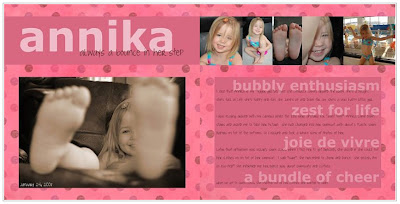
Annika


I applied some of the ideas that were suggested in two of my recent reads (Clean & Simple, the sequel and A Designer's Eye) but not actually a scraplift. The fonts I used were Verdana and Joyful Juliana (which I got from the Internet). The background paper is from Zazou.

Journaling:
I joke that Annika is my “Tigger girl” because she literally jumps around the room. She’s a delight. She’s full of life. She’s fun. She jumps up and down for joy. She’s a very happy little girl.

I was playing around with my camera while the kids were upstairs for “quiet time”. Annika came downstairs and asked me to take her picture. She had changed into her swimsuit...with about 6 plastic swim diapers on top of the bottoms. So I obliged and took a whole slew of photos of her.

Later that afternoon Oskar had swim class (by coincidence). When I told her to get dressed, she asked if she could put her clothes on on top of her swimsuit. I said "sure". She proceeded to cheer and dance. She yelled, I'm so ess-ited!" She informed me her dance was about swimsuits and clothes.

When we got to swim class, she stripped out of her clothes and wanted to swim. I love my bubbly and enthusiastic little girl.

Posted by Picasa

Designing with Photos

by Alison Tyler Jones & Donna Smylie


This book has nice photos and some good tips but for the most part I think it's pretty basic...in terms of technique, anyway. Or perhaps it's just that I'm *that* skilled a photographer. *hehe* The second part of the book was about using your photography for crafts and that part didn't really do it for me. I guess I'm too focused on scrapbooking right now. And while I think they did touch on that, as I recall it wasn't really my style. Having said all that, I enjoyed reading it and immediately rushed off to take some inspired photographs. But in terms of technique, the Understanding Exposure book will probably be a better resource tool for me.

Wednesday, January 30, 2008

Clean & Simple: the Sequel

by Cathy Zielske


This book definitely speaks to me. Cathy's style is right up my alley - I love it. In fact, it's funny because this evening as I was reading the last couple of pages, I came across a design that she scraplifted from an Amex ad...which, if you read back on this blog, I just did two days ago. *hehe*

I thought The Big Picture addressed the philosophy of scrapbooking in a general way and I would say this book is more focused on design . Cathy and Stacy Julian (author of The Big Picture) actually work together at Simple Scrapbooks and they share a similar approach to the art of scrapbooking. So the books complement each other nicely.

All of the design is pretty high level but I still found it helpful and informative. I took a graphic design class in college...or at least I started one...but the only thing I remember is the difference between serif fonts and sans serif fonts. I think I actually had to drop it for some reason or another. At any rate, this book touches on some simple rules of graphic design including white space, margins and fonts.

I'm walking away from this with some new ideas and techniques to try out and feeling very inspired. At some point I'd love to take another design class. (And I'd like to get the first Clean & Simple now...not to mention a subscription to Simple Scrapbooks magazine.)

Tuesday, January 29, 2008

Things I Hate About Pregnancy


I redid my pregnancy page. When I tried to use the tablet the first time, I was having issues (I write too fast, apparently). But I've discovered that the calligraphic brushes (as opposed to the basic brushes) seem to work better for me so I redid it with the tablet...instead of the handwriting font...which I'm not totally sold on. (It was a fun exercise but I didn't do a very good job with it...and now my trial's expired.) Anyway, I added some journaling with Century Gothic but otherwise everything is is the same. Scriptina (from the Internet) at the top and my handwriting for the rest.

Monday, January 28, 2008

playing at the park


Stole the layout from a dominomag.com ad. The fonts I used were Monteuideo and Angelina (which I got from the web...maybe DaFont). I used Adobe Photoshop CS and my Wacom Bamboo.

Photoshop Shortcuts

I googled "photoshop cs shortcuts" and found a very nice cheat sheet at this site: Trevor Morris Photographics.

Amex


Here's my Amex page. Looks a little funky here with the white on white. Oh well. Um...used my Wacom Bamboo to write out my responses. Got the Amex logo off the web and then just copied the questions from a couple of Amex ads that I found in a magazine (Domino to be exact). The fonts are Times New Roman and Arial.

Posted by Picasa

Two Page Spreads

I don't think I'm going to continue to ALWAYS make two page spreads. It's not like you see very many two page spreads when you're flipping through a magazine. I'll still try to think about how the pages will look sitting next to each other but no biggie if it's not an actual 2 page spread. I'll make that something special. :)

[2/3/08 edit: Who am I kidding?! I'm still going to make two page spreads.]